Spectrum Aqautics
CONTROL BOX TC12 4 BUTTON 5AH BATTERY
CONTROL BOX TC12 4 BUTTON 5AH BATTERY
Couldn't load pickup availability
Speak to our care team: (833) 422-7328
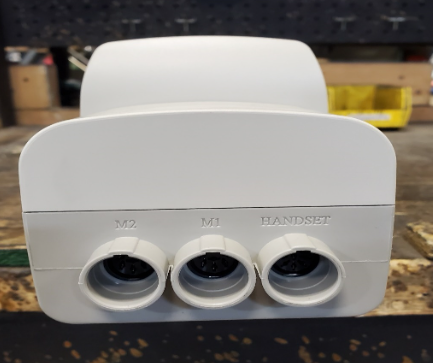
3 cables going into the bottom of the control box:
Right hand cable is for the handset
M1 (middle) for up and down actuator cable
M2 (left) for left and right rotational cable
Note: for Aqua Buddy, the actuator cable needs to go in the M1 port
Changing out at Motion Trek Control Box
1. Unplug the 3 cables going into the bottom of the current control box. [Right hand cable is for the
handset, M1 for left and right cable, M2 for up and down cable]
2. Remove battery.
3. There are 2 Phillip’s head screws holding the control box to the bracket – remove them.
Reverse process to put on the new control box.
Note: there is a bracket that goes onto the mast. If for some reason you need to remove this, it’s
held on with 3 10-24 Torx screws.
SKU:
Share